Probable cause
A deterministic guess at what actually caused it, never a black box
Five named rules, deployment, external dependency, database, database connections, and background job, each scored from real signals already on the incident, and, once GitHub or GitLab is connected, the exact pull request and developer who shipped the change.
A rules engine that shows its own reasoning
The likely cause is the third step of an incident's page, right after what changed, and it leads Where to look on an issue. Five rules are checked, in order, and the highest-confidence match wins: Deployment scores a deploy within 15 minutes before the incident, weighting timing 60% and, when release data exists on the spike's own events, how much of the spike actually referenced that release 40%. With no deploy reported, it falls back on the release your SDK sends with each error: a release that first appeared in the errors just before the spike counts as an inferred deploy, named as a release rather than a deployment, scored lower, and labeled as inferred until a real deploy is reported for it. With GitHub or GitLab connected, it also checks every file the deploy changed against the failing stack traces: a changed file that the failures run through is listed as evidence and raises the score, and a deploy whose changes appear in none of them is marked as a point against it and scores lower. When more than one deploy went out shortly before the incident, each is weighed on its own, so an earlier deploy whose change is in the failing code is named over a later one whose change isn't. External dependency and Database each score proximity times magnitude of a latency spike, with a real corroborating failed call (or, for the database rule, a degraded/critical connection pool) adding a documented bonus on top, never inventing a precise multiplier where there isn't one. Database connections covers what the database rule can't see on its own: when the connection pool runs dry, every query waits for a connection and looks slow, so the slowest one is a symptom, not the thing to fix. It matches on a pool metric under pressure or on errors saying the app couldn't get a connection, adds weight when several different queries slowed at once, and names a sharp rise in traffic just before as what drained the pool. Background job scores on presence and volume alone (a floor of 20% confidence just for a real failure existing in the window, scaling up to full magnitude at 10 or more), since a failing job is often part of the spike itself, not a separate upstream cause with its own lead time to measure.
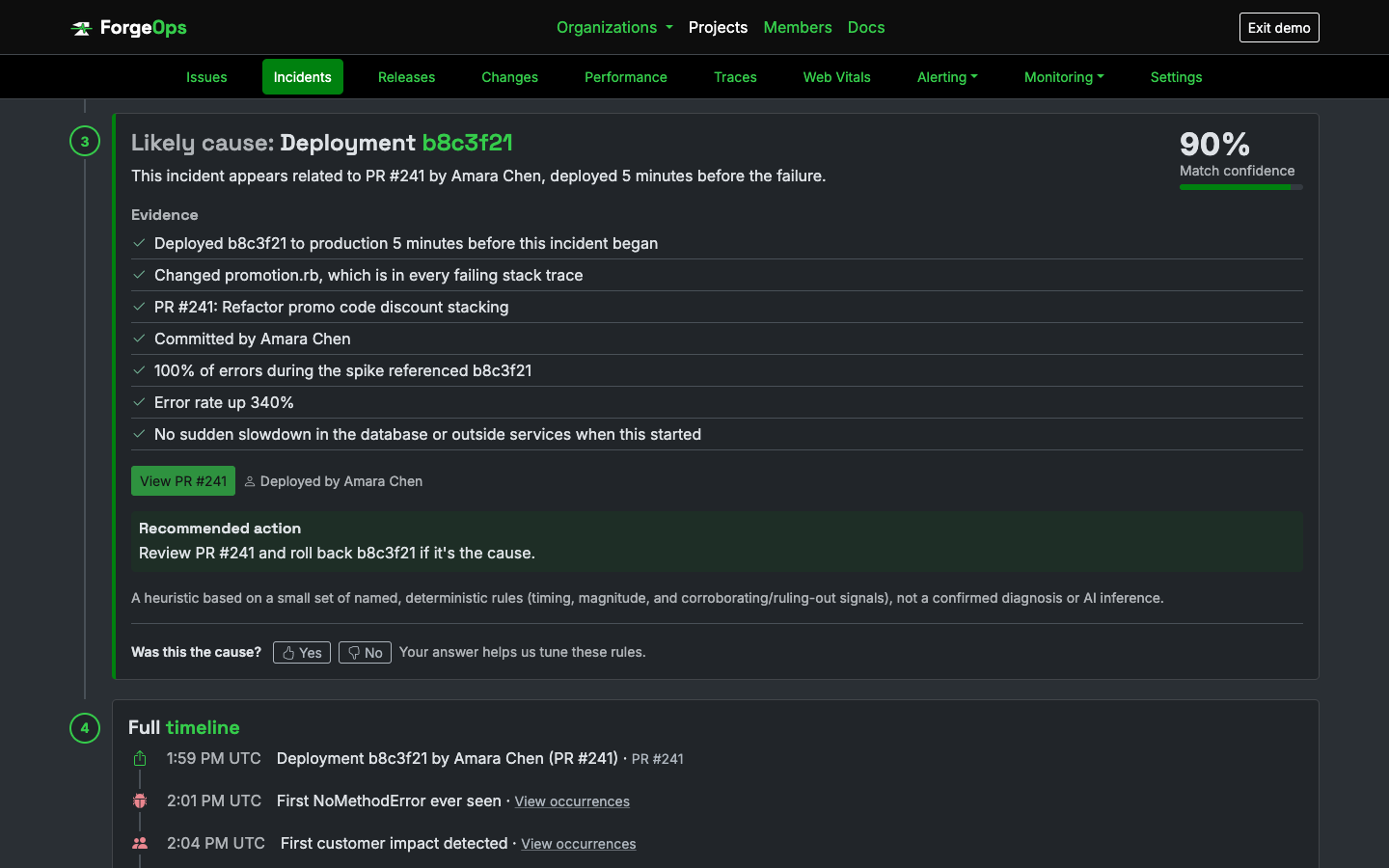
A real confidence score and evidence list, not an unexplained verdict.
Replay an incident and watch the answer change
The clearest way to see the rules work is to watch them on one incident, minute by minute. The replay on this site is a checkout incident eight minutes after a deploy: the deploy is the first answer, loses confidence once the files it changed turn out to be nowhere in the failing stack traces, and gives way to a slow query when that data arrives. Every confidence and evidence line in it is what the rules say about that data at that minute, with only the telemetry that had arrived by then.
You can replay an incident of your own too, with no account, which is the way to check ForgeOps against one your team has already worked out: upload the errors from around it (Sentry events, your logs, or a CSV), say what your team found, and see when it would have been detected, what would have been named at each point, what counted against it, and how the conclusion compares with yours. Nothing you upload is saved.
Connect source control and a deploy names its own pull request
Once a project's GitHub or GitLab repository is connected, that provider's own deployment, push, and pull-request webhooks backfill the commit message, author, and PR number onto the matching deploy by commit SHA, automatically. The deployment rule's own explanation changes with it: instead of "v2.41.0 was deployed to production 5 minutes before this incident began," it reads "This incident appears related to PR #4821 by luke, deployed 5 minutes before the failure," with a direct link to the real pull request, right from the incident page.
See it on your own data
Free plan included, no credit card required. New organizations start with 14 days of Business.
Get started freeGet