GitHub
File a real GitHub issue without leaving ForgeOps
Connect a repo with a personal access token, then turn any issue into a real GitHub issue in one click: title, culprit, and backtrace included.
- A personal access token, not a GitHub App: no app to register, no review to wait on, works the moment the token's saved
- One click files the issue: title, culprit, first/last seen, event count, and the latest occurrence's backtrace, plus a link back to the ForgeOps issue
- Filing again is blocked once one exists for a given issue; the button becomes a link to the GitHub issue instead of creating a duplicate
- Optional: a plain-language AI summary, suggested priority, and suggested labels added to the filed issue, Business plan and up
A token you generate yourself, pasted into project settings
Connecting a repo is a personal access token from your own GitHub account (Settings → Developer settings → Personal access tokens) with the repo scope, or Issues: Read and write on a fine-grained token, pasted into that project's settings alongside which repo (owner/repo) it should file into.
From there, an issue's detail page gets a "Create GitHub issue" button for anyone with at least member access. The request goes straight to GitHub's own REST API; nothing routes through a third-party OAuth flow first.
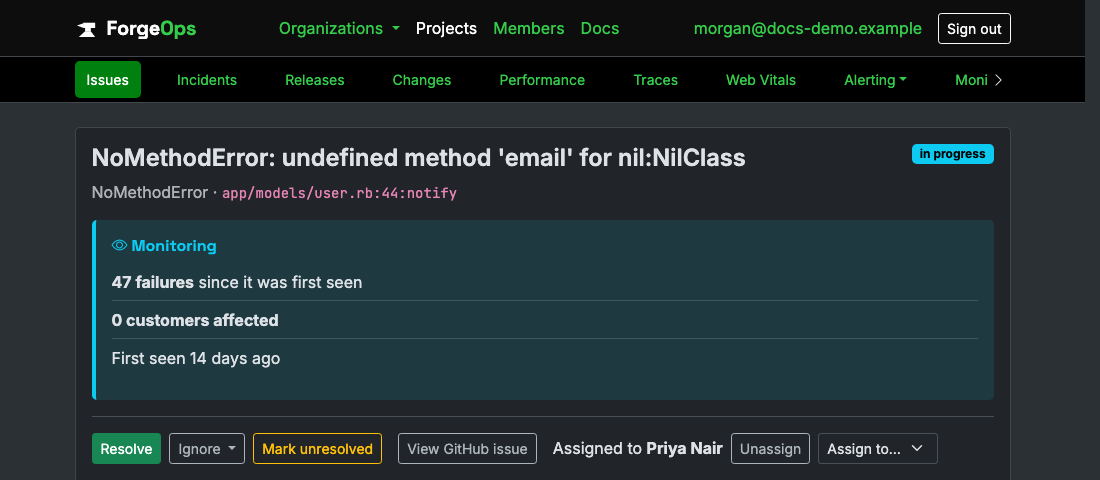
The same action row as Resolve/Ignore/Reopen, once a repo's connected.
Optional: an AI summary, right in the filed issue
Turn on "Use AI to enrich tickets" in a project's settings and every issue filed from it gets a short, plain-language summary of what likely went wrong, plus a suggested priority and a couple of suggested labels, ahead of the usual culprit/backtrace detail. It's clearly labeled as AI-suggested text, not written into GitHub's own priority or label fields.
Business plan and up, with a monthly allowance of enrichment calls per organization; a ticket still files normally, with its usual content, once that allowance runs out for the month.
See it with your own alerts
Free plan included, no credit card required. New organizations start with 14 days of Business.
Get started freeGet