SSO
SAML or OIDC, configured per organization, without a single security shortcut
Every organization brings its own identity provider, but linking an IdP login to an existing account still always has to be proven from the account's own side, never just asserted by the IdP.
Per-organization, not app-wide
An organization's SAML or OIDC settings (IdP SSO URL, certificate, OIDC issuer and client id) live on that organization itself, not a shared instance-wide config: the one real secret, the OIDC client secret, is a dedicated encrypted column, never stored alongside the rest in plain form. Each strategy is set up per request from the organization slug in the URL; an organization that hasn't enabled a given provider simply has no working strategy for it, rather than silently authenticating against stale or wrong settings.
Signing in through SSO for the first time provisions a brand-new account automatically, confirmed immediately: an identity already verified by the organization's own IdP has nothing left to confirm by email.
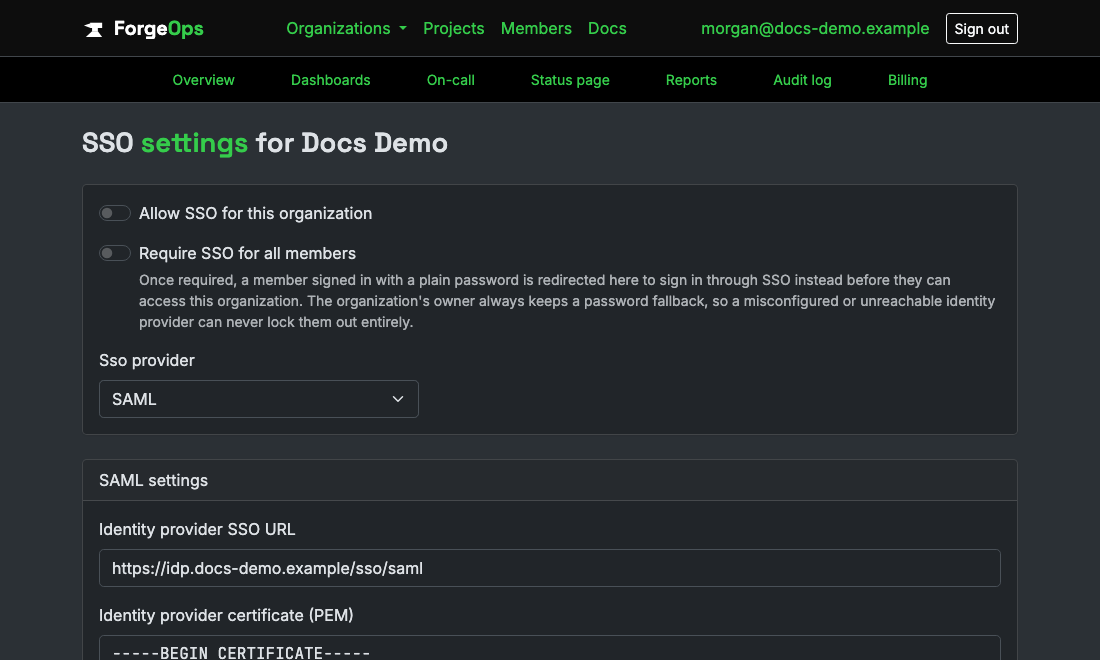
Each organization brings its own IdP; nothing here is shared across organizations.
Account linking can never be asserted, only proven
If an IdP asserts an email that already belongs to an account on this instance, sign-in doesn't just attach to it. Doing that purely from what the IdP claims would let anyone who controls an organization's own SSO config (any owner, self-serve, no approval step) silently take over any other user's account instance-wide, just by asserting their email from their own IdP.
The safe path is a deliberate "Connect via SSO" action: it identifies which account to link from the requester's own session, already proven by an earlier password or SSO login, never from anything the IdP itself asserts. Whoever controls an organization's SSO settings has no way to steer that link onto an account that isn't already the one making the request.
A deactivated membership (most often from SCIM deprovisioning) stays deactivated through SSO too: signing in again doesn't quietly reactivate it. Access only ever comes back through a deliberate reactivation, never as a side effect of still being able to log in.
Required, but never a full lockout risk
An organization can go further than just offering SSO and actually require it: once turned on, every member other than the organization's own owner has to sign in through the configured IdP, with a password sign-in refused instead. The owner is deliberately exempt from their own organization's requirement, a real break-glass path if the IdP configuration itself ever goes wrong, rather than a setting that can strand an entire team, owner included, outside its own account.
That's the same reasoning this app already applies everywhere a role-based ceiling exists (an organization always keeps at least one owner, removing the last one is refused outright): a safety valve built from who someone already is, not a separate bypass flag anyone could accidentally leave on.
Business plan and up
Enforced at the model layer: an organization's own SSO setting simply can't be saved as enabled unless its plan allows it, regardless of which path in the app tries to flip it.
See it on your own data
Free plan included, no credit card required. New organizations start with 14 days of Business.
Get started freeGet