Triage verdict
Know in seconds whether it needs you right now
Every issue and incident opens with one verdict, Needs attention now, Investigate, Monitoring, or Resolved, and the facts behind it: who it's hurting, how fast it's moving, which endpoint, and what just shipped.
The first minute of triage, answered for you
The top of an issue answers the question you open it with: do I need to deal with this now? Needs attention now means an open incident rated high or critical behind it, a sharp climb reaching real customers, or so many customers affected that the rate barely matters. Investigate means worth a look but not yet a fire: a brand new issue, one that just came back, a real spike, or a low-severity incident. Monitoring is everything steady or ignored. The cutoffs are the same ones incident detection uses, so an issue and its incident never disagree.
Beside the verdict: how many customers it's reaching, which way it's moved in the last hour, when it started, and how long after a deploy. Buttons go straight to the incident, the pull request, a comparison with the deploy before it, and the traces from around that time.
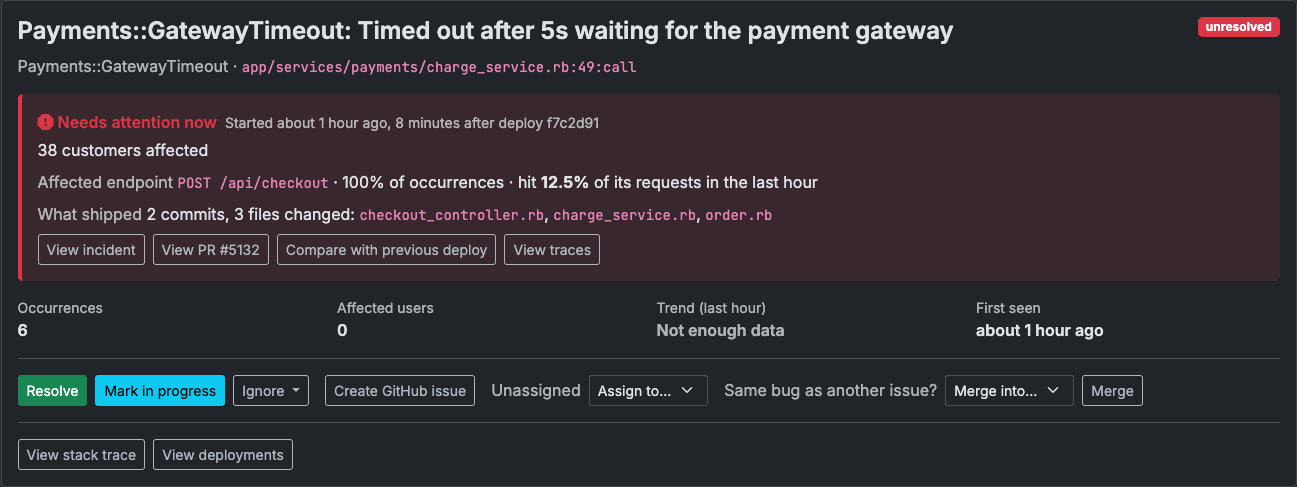
The verdict, and every fact it rests on, in one strip.
Which endpoint, and how hard it's failing
Errors from the Ruby SDK (0.12.0 and up) say which request they happened in, so the verdict names the endpoint most occurrences came from and what share of them it accounts for. When the SDK reports request counts too, it adds how much of that endpoint's traffic this issue failed in the last hour, and only once there are enough requests for the number to mean something.
What shipped, without leaving the issue
With GitHub or GitLab connected, ForgeOps reads each deploy's changes since the one before it, once, with the access token you already gave it: how many commits and which files. It shows next to any issue or incident that started after that deploy, alongside a link to the full comparison. Slack alerts, and the on-call pages sent by email, Slack, Teams, or webhook for an incident, carry the same verdict, so the first call can be made without opening anything.